


Description
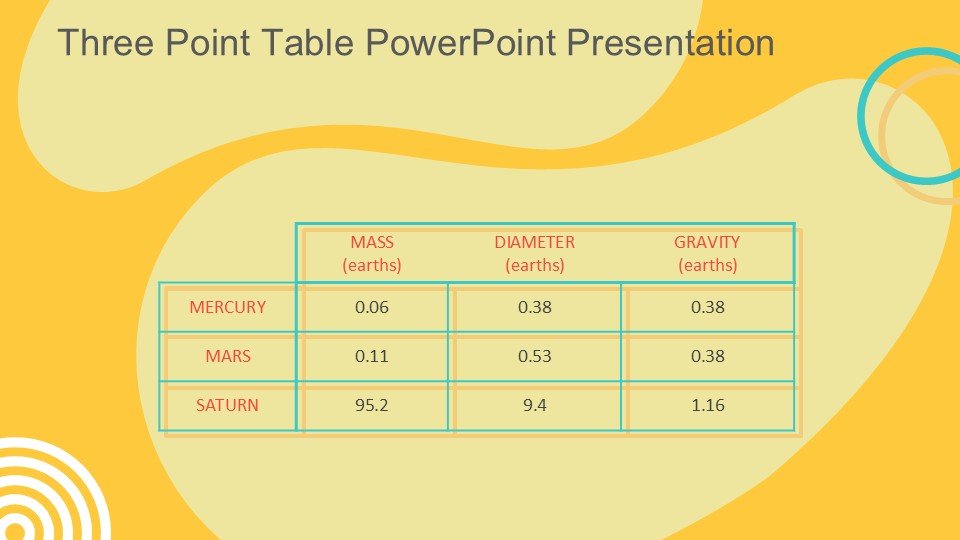
The Three Point Table PowerPoint Presentation slide template is an exceptional PPT template specifically designed to streamline the process of data and information presentation for educators, professionals, and advocates. This presentation template serves as a highly practical resource for presenting three distinct points or sets of data in a clean, organized, and visually appealing manner. Whether you’re a teacher illustrating varied points in a lecture, a business professional comparing different strategies, or an advocate outlining key arguments, this PPT slide is tailored to help you effectively convey your message.
The Three Point Table PowerPoint Presentation PPT template is crafted with usability and adaptability in mind, ensuring that users from all professional backgrounds can enhance their presentations without requiring advanced technical skills. The design is sleek and modern, focusing on clarity and readability to keep the audience engaged and informed. Each section of the three-point table is clearly differentiated, making it easy for the viewer to follow along and understand distinct elements and comparisons.
Moreover, this presentation template is not just about aesthetics; it is a functional tool designed to make your presentation process as smooth as possible. The template can be fully customized to suit various presentation needs, enabling users to adjust colors, fonts, and text to align with their specific organizational or personal brand identity. This flexibility ensures that the Three Point Table PowerPoint Presentation PPT template is not only useful for a single occasion but can be adapted for multiple contexts and audiences.
Integrating this PPT slide into your presentation arsenal will undoubtedly enhance the quality of your communication, allowing you to present complex information in a straightforward and digestible format. It is an ideal choice for anyone looking to elevate their presentation skills and effectiveness, ensuring that each point made is impactful and memorable.
Features:
– Fully editable templates: Customize every element of the slides with ease.
– Compatible with PowerPoint and Google Slides: Works across popular presentation platforms.
– High-quality design: Professional and clean layout to keep your audience engaged.
– Versatile color schemes: Choose from various color options to match your branding or preference.
– Easy to use: Simple drag-and-drop functionality to add, remove, or alter elements swiftly.
Use Cases:
– Ideal for classroom teaching on complex subjects, enabling clear and concise explanations.
– Perfect for business meetings to compare products, strategies, or performance metrics.
– Beneficial for advocacy groups to outline key points in campaigns or public discussions.
– Useful for workshops and seminars, facilitating discussion through clear visual representation.
– Suitable for personal presentations at conferences or community events, ensuring message clarity and retention.




There are no reviews yet.