


Description
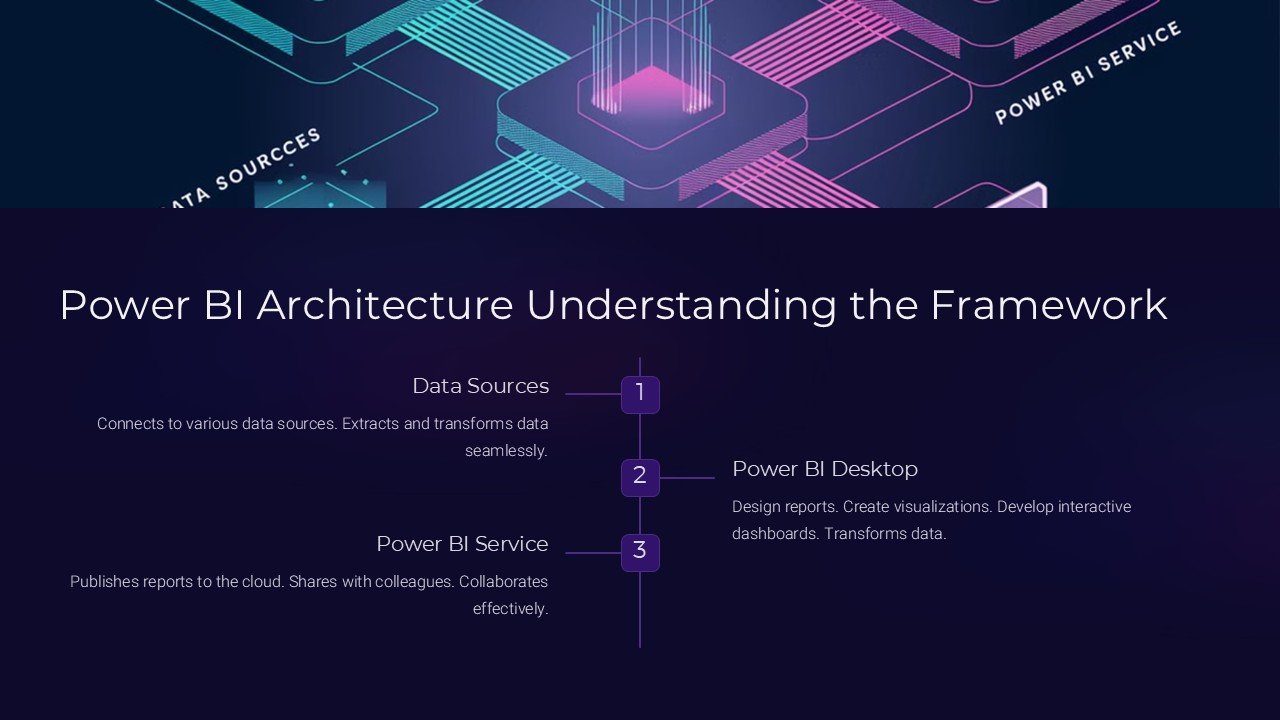
Introduce the Power BI Architecture: Understanding the Framework PowerPoint Presentation, a comprehensive tool designed to equip professionals with a deep dive into the architecture of Power BI, Microsoft’s interactive data visualization and business intelligence platform. This meticulously crafted presentation is ideal for IT managers, data analysts, and business intelligence professionals who are keen on understanding the intricate frameworks that make Power BI a powerhouse for data analysis and decision-making.
This presentation includes a series of slides that cover all aspects of Power BI architecture, beginning with an overview of the components that form the Power BI service. It details how Power BI desktop, the web service, and mobile apps interact seamlessly to provide a robust analytics and reporting environment. The slides delve into the core of Power BI, including its integration capabilities with various data sources and its internal components like datasets, reports, dashboards, and tiles, providing a clear view of how data moves and is transformed within the platform.
Each slide in the Power BI Architecture: Understanding the Framework PowerPoint Presentation is crafted to not only inform but also engage the audience. The use of high-quality graphics, charts, and diagrams helps in breaking down complex information about Power BI’s components, such as the Query Editor, Data Model, and DAX formula engine, making them easier to understand. The presentation also explores the security features within Power BI, explaining how data is protected through the various layers of security, including the Azure Active Directory (AAD) and the role-based access controls.
A special focus is given to the Power BI Gateway, which connects on-premises data to Power BI cloud services, elucidating its importance in the architecture for maintaining up-to-date data without the need to move data permanently into the cloud. Additionally, the slide on Power BI Embedded offers insights into how Power BI capabilities can be integrated into custom applications to enhance their analytics features.
For professionals looking to customize or extend their learning, the Power BI Architecture: Understanding the Framework PowerPoint Presentation comes with fully editable templates. These allow for modifications and personalization, aligning with specific organizational needs or focusing on particular architectural components in more detail. The compatibility with both Microsoft PowerPoint and Google Slides ensures that the presentation can be accessed and edited across different platforms, enhancing its versatility and user-friendliness.
Key features of this presentation include:
1. **Fully Editable Templates:** Each slide is customizable, allowing users to tailor the content according to their specific needs or branding requirements.
2. **Compatibility with PowerPoint and Google Slides:** Ensures that the presentation can be used across various devices and platforms, making it accessible for all users.
3. **Comprehensive Content Coverage:** From basic architecture to advanced components, the presentation covers all key areas of Power BI’s framework.
4. **Engaging Visuals:** High-quality graphics and diagrams facilitate better understanding and retention of information.
5. **In-depth Security Insights:** Detailed slides on security architecture help in understanding the measures taken to protect data within Power BI.
The Power BI Architecture: Understanding the Framework PowerPoint Presentation is an essential tool for anyone looking to gain a thorough understanding of how Power BI works under the hood. It’s designed not just to inform but to enhance the viewer’s ability to utilize Power BI effectively in their own business environments.


There are no reviews yet.